I Love You: How to Use This Sweet Handwritten Font Without the Common Pitfalls
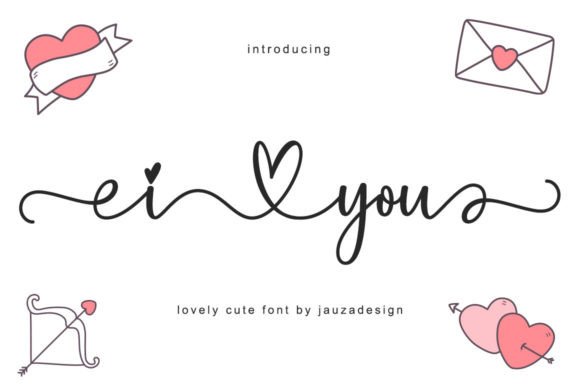
Choosing a typeface that feels personal and authentic is a challenge for many designers and creators. I Love You offers a solution with its sweet, friendly, and natural handwritten style. This font is more than just a script; it’s a versatile tool designed to add a touch of warmth and uniqueness to a vast array of projects. From elegant wedding invitations and creative branding to striking album covers and magazine layouts, its character can elevate your work.
However, the very qualities that make a handwritten font like I Love You so appealing—its personality and irregularity—can also lead to frustrating results if used incorrectly. Many beginners and even seasoned professionals stumble over common issues that undermine the font’s potential. Understanding these pitfalls is the first step toward creating designs that look polished and communicate your intended message effectively.
The Critical Mistake of Overlooking Legibility
The most frequent error with decorative script fonts is prioritizing style over readability. I Love You is designed for display and headline use, not for long blocks of body text. Attempting to use it for paragraphs, product descriptions, or detailed instructions will almost certainly frustrate your audience. The intricate letterforms and flowing connections, while beautiful, can become a dense, unreadable wall of text at small sizes.
A better approach: Reserve I Love You for key elements where its charm can shine without hindering comprehension. Use it for a hero headline, a company logo, a pull quote, or a title card. Pair it with a clean, highly legible sans-serif or serif font for body copy. This contrast creates a visually appealing hierarchy and ensures your core message is always clear. For example, a wedding invitation might use I Love You for the couple’s names and a simple sans-serif for the event details.
Neglecting the Power of OpenType Features
A common oversight is treating I Love You as a static, single-option font. This font is PUA encoded, which is a significant technical advantage. PUA (Private Use Area) encoding means that all the additional glyphs, swashes, and ligatures are accessible even in basic design software that doesn't fully support advanced OpenType features. Ignoring these extras is like buying a toolkit and only using the hammer.
These alternate characters are not just decorative; they are essential for avoiding awkward letter combinations. For instance, certain double letters or vowel sequences in a script can look clunky or unnatural. The available ligatures in I Love You are designed to solve this, creating smoother, more authentic connections that mimic real handwriting.
How to implement this: In software like Adobe Illustrator or InDesign, use the Glyphs panel to explore the full character set. Look for stylistic alternates and discretionary ligatures. In other applications, you may need to copy and paste individual glyphs from a character map utility. Taking this extra step transforms generic text into custom, professional-looking typography. It’s the difference between a design that looks like it used a font and one that looks intentionally crafted.
Mismatching the Font’s Tone with Your Project
Not every project calls for the same voice. A mistake is using I Love You in a context that clashes with its friendly, sweet, and slightly whimsical personality. For instance, it would be a poor choice for a corporate finance report, a technical manual, or a brand focused on rugged, industrial aesthetics. The font’s inherent warmth would undermine the seriousness or precision required.
Conduct a tone check: Before applying the font, ask yourself: Does my project need to feel personal, romantic, creative, or approachable? If the answer is yes, I Love You is likely a strong candidate. If the project demands authority, neutrality, or stark minimalism, you should look elsewhere. Always align your typographic choices with the emotional core of your message. A freelance photographer specializing in family portraits might use it perfectly on their website, while a cybersecurity consultant would find it inappropriate.
Skipping the Pre-Download Evaluation
Impulsively downloading a font based solely on a preview image can lead to wasted time and disappointment. The static samples provided on font marketplaces don’t always show how the font handles your specific words, letter combinations, or spacing requirements.
A smarter workflow: Whenever possible, use the live preview tools available on most font distribution sites. Type out the exact phrase or name you intend to use. Check how the uppercase letters interact with the lowercase, and see if any letter pairs create awkward gaps or overlaps. This simple test can reveal if you need to rely heavily on alternate glyphs or if the font’s default spacing works for your needs. It’s a small investment of time that prevents major headaches later in the design process.
Final Checks Before You Commit
Before finalizing your design with I Love You, run through a quick checklist to ensure quality and professionalism:
- Test at the intended size. View your design at the scale it will be seen—whether on a business card or a billboard. Zoom in and out to check for clarity.
- Print a proof. If the design is for print, always produce a physical proof. Colors and fine details can render differently on paper than on screen.
- Check the license. Confirm that the font license covers your specific use case, whether for a personal blog, a commercial product, or a client’s branding.
- Get a second opinion. Ask someone unfamiliar with the project to read the text. If they struggle to decipher any word, you have a legibility issue to fix.
By approaching I Love You with an understanding of its strengths and its intended use, you can avoid common mistakes. This thoughtful application allows the font’s unique, handwritten charm to genuinely connect with your audience, making your designs not only beautiful but also effective and professional.