Spotting: A Whimsical Display Font for Creative Projects
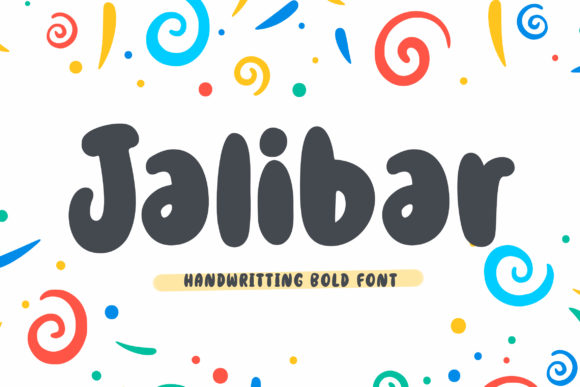
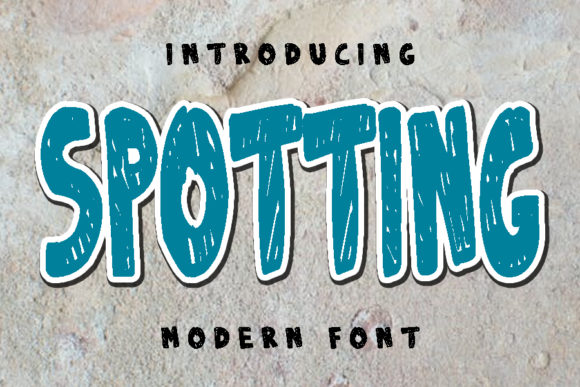
Sometimes a design needs more than just clarity; it needs personality. If you have ever found yourself scrolling through hundreds of typefaces looking for something that feels friendly, approachable, and undeniably fun, you might be looking for exactly what Spotting offers. At its core, this is a display font that balances a thick, visual weight with a soft, rounded aesthetic. It is designed to catch the eye immediately, making it a fantastic choice for headers, logos, and social media graphics where you need to make a statement without being aggressive.
The defining characteristic of this typeface is its ability to be "cute" without being childish. Often, designers struggle to find a font that feels whimsical but still holds up in a professional setting. Spotting bridges that gap. The letterforms are constructed with a certain quirkiness that suggests movement and energy. It is not a standard block font; it has curves and variations that give it a hand-drawn feel, even though it maintains the consistency required for professional digital use.
Why Choose a Quirky Display Typeface?
In the world of typography, display fonts serve a specific purpose. Unlike body text fonts like Georgia or Arial, which are designed for long-form reading, display fonts are built for impact. They are the visual equivalent of a headline. However, many display fonts can feel cold, corporate, or overly aggressive. This is where Spotting shines.
Its value lies in its versatility across "lifestyle" and "creative" niches. Consider the modern digital landscape: we are surrounded by minimalism, stark lines, and monochrome palettes. While that looks clean, it can sometimes feel sterile. Introducing a typeface that is described as whimsical and a bit quirky adds warmth to a design. It invites the viewer in rather than demanding their attention through sheer volume. For a small business owner trying to build a brand that feels accessible and human, this font acts as a silent ambassador of that vibe.
Practical Applications for Creators and Professionals
You do not need to be a graphic designer to appreciate the utility of a good font. For bloggers and content creators, typography is often the first thing an audience notices. If you are designing a Pinterest pin or an Instagram story, the font sets the tone before the user even reads the words. Using Spotting for a blog header about travel, food, or parenting instantly signals that the content is lighthearted and enjoyable.
For entrepreneurs and small business owners, the applications are just as relevant. Think about a bakery, a boutique clothing store, or a pet grooming service. These industries thrive on personality. A logo utilizing a thick, rounded font like Spotting communicates reliability (due to the weight of the letters) and friendliness (due to the rounded edges). It avoids the stiff feeling of a serif font and the boring feeling of a standard sans-serif.
- Logo Design: Perfect for brands that want to appear modern yet approachable.
- Social Media Graphics: Excellent for headers on Facebook, YouTube thumbnails, and Instagram posts to grab attention quickly.
- Product Packaging: Works well for artisanal goods, snack packaging, or children’s toys where visual appeal is key.
- Greeting Cards: Its cute nature makes it ideal for invitations, thank you notes, and holiday cards.
Integrating Spotting into Your Workflow
One of the best things about adding a font like this to your library is the ease of use. You do not need to be a typography expert to pair it effectively. Because Spotting has such a distinct personality, it works best when it is given room to breathe. This means it pairs exceptionally well with simple, clean body text.
Imagine you are creating a flyer for a community event. You want the title to pop. You select Spotting for the main event name. It looks great—thick, readable, and energetic. Now, for the details—the time, date, and location—you need something that doesn't compete for attention. A standard sans-serif font will complement the whimsy of the header without creating visual clutter. This contrast is a fundamental design principle that helps guide the viewer's eye from the most important information (the header) to the supporting details.
Who Benefits Most from This Style?
While almost anyone can find a use for a display font, certain groups will find Spotting particularly valuable. Educators creating materials for younger students or engaging presentations will find that the thick lettering is easy to read and the style keeps the mood light. Freelancers working in creative fields—like illustration or wedding photography—can use it to style their portfolio headers to reflect their artistic sensibility.
Even for personal projects, the appeal is strong. If you are organizing a family reunion, planning a wedding, or just making labels for your home pantry, using a cohesive and attractive font elevates the task from a chore to a creative outlet. It turns a simple PDF into a polished document.
Important Considerations Before You Start
While Spotting is a fantastic tool, it is important to understand the context of "display" typography. Because the letters are thick and stylized, they are generally not suitable for long paragraphs. If you try to write a 500-word essay using a font like this, it will likely become difficult to read and overwhelming to the eye. The "thickness" that makes it great for headers can become a wall of text if used incorrectly.
Furthermore, consider the tone of your project. While it is versatile, it leans towards the casual and playful. If you are drafting a legal contract, a formal resignation letter, or a medical report, a whimsical font is probably not the appropriate choice. However, for marketing materials, merchandise, and digital media where you want to brighten up the design, it is an excellent candidate.
Technical Tips for Best Results
When you download and install Spotting, you will notice that it renders best at larger sizes. This is typical for fonts with thick strokes. If you use it at a very small size, the letters might bleed together, and the spacing might feel too tight. Always test the font at the size you intend to use it for.
- Check Spacing: Ensure there is enough letter spacing (tracking) so the thick lines don't touch.
- Color Contrast: Because the font is bold, it holds up well against colorful backgrounds, but ensure there is enough contrast for accessibility.
- File Formats: Make sure you have the correct file format (like .OTF or .TTF) for your specific design software, whether it is Canva, Adobe Illustrator, or Microsoft Word.
Ultimately, Spotting is more than just a collection of letters; it is a mood setter. It is designed to bring a smile to the viewer's face and inject a bit of joy into the visual landscape. Whether you are a professional marketer looking for a fresh headline font or a hobbyist scrapbooker wanting to add a special touch to your pages, this typeface offers a reliable and charming solution. By understanding its strengths and applying it to the right contexts, you can confidently enhance your projects and achieve the polished, whimsical look you desire.