Mastering Modern Design: A Practical Guide to Using the Mesveda Sans Font Family
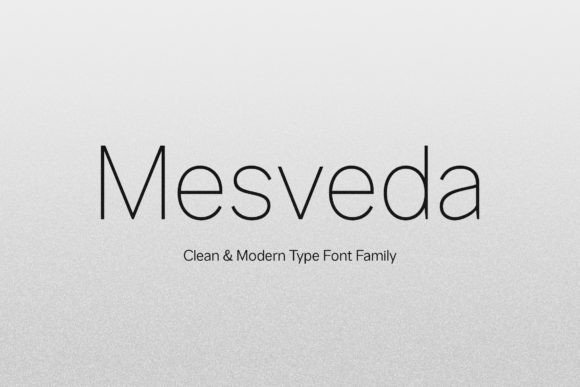
In the vast ecosystem of digital typography, finding a typeface that balances aesthetic appeal with functional versatility is a common challenge for designers. The Proudly Present Mesveda - Sans Font Family enters this space as a clean, modern solution designed for contemporary needs. Characterized by its minimalist aesthetic, Mesveda is more than just a set of letters; it is a comprehensive typographic system. With 14 distinct styles ranging from thin to bold, including matching italics, this font family offers the flexibility required for complex branding systems and simple UI designs alike.
However, owning a versatile tool and using it effectively are two different things. Whether you are a freelancer building a brand identity, a marketer designing ad creatives, or a hobbyist working on a wedding invitation, the decisions you make regarding font selection and application can significantly impact your project's success. This guide explores how to leverage Mesveda correctly, avoiding common pitfalls that often lead to unprofessional results.
Understanding the Anatomy of Mesveda
Before integrating Mesveda into your workflow, it is helpful to understand its technical capabilities. As a clean modern typeface, it supports a wide range of applications, from web design to product packaging. It features full uppercase and lowercase sets, numerals, and punctuation, ensuring you have the building blocks for clear communication.
One of the most overlooked aspects of premium fonts is their encoding. Mesveda is PUA (Private Use Areas) encoded. This is a critical feature for creatives who want to access special glyphs and ligatures without needing advanced design software. It ensures that whether you are using a professional suite or a basic text editor, the full character set is accessible to you.
Avoiding the "One Weight Fits All" Trap
A frequent error among beginners and even some professionals is limiting a font family to a single weight. Because Mesveda offers a spectrum from Thin to Bold, using only the regular weight creates a flat, one-dimensional visual hierarchy.
The Mistake: Using the same weight for headers, sub-headers, and body text. This forces designers to rely solely on font size to create contrast, which often results in a cluttered layout where the eye doesn't know where to focus.
The Impact: Poor readability and a lack of professionalism. In UI design, for example, buttons and navigation elements need to stand out from descriptive text. In editorial design or book covers, the lack of weight contrast can make the title fail to grab attention.
The Better Approach: Utilize the variable nature of the Mesveda family. Pair the Bold weight for headlines with the Light or Regular weight for body copy. This creates a natural rhythm that guides the reader’s eye. For instance, in a logo design, combining a Thin weight for a descriptor word with a Bold weight for the brand name creates immediate elegance and authority.
The Overlooked Power of Ligatures and Glyphs
Many designers download a font, type out their text, and move on. With a feature-rich family like Mesveda, this is a missed opportunity. The inclusion of OpenType features and ligatures is designed to solve specific aesthetic problems, particularly with letter pairing.
The Mistake: Ignoring the stylistic alternates and ligatures available within the font file. Common letter combinations (like "tt", "fl", or "fi") can sometimes look awkward or leave unnatural gaps in standard type.
The Impact: The text feels "digital" and disjointed rather than polished. In high-end applications like wedding designs, fashion branding, or luxury stationery, these small imperfections are noticeable and can cheapen the perceived value of the product.
The Better Approach: Access the glyphs panel in your design software (such as Adobe Illustrator or Photoshop) to view the full character map. Because Mesveda is PUA encoded, you can easily copy and paste these special characters even if you are not an expert in OpenType settings. Look for contextual alternates that smooth out the flow of text. This is particularly useful for art quotes or magazine headlines where typography is part of the art itself.
Context is King: Matching Font Style to Project Needs
Not every font fits every mood. Mesveda is defined by a minimalist aesthetic, making it ideal for modern, clean, and professional environments. However, a misunderstanding of "versatility" can lead to poor application choices.
The Mistake: Applying a minimalist sans-serif to a theme that requires heavy ornamentation or historical context. For example, using Mesveda for a project that requires a vintage, grunge, or highly decorative handwritten feel might clash with the font's inherent geometry.
The Impact: The design sends mixed signals. If you are designing a product label for an organic, rustic tea, a very thin, geometric sans-serif might feel too sterile and corporate, failing to connect with the target audience.
The Better Approach: Evaluate the emotional tone of your project. Mesveda excels in Web design, UI design, Corporate Branding, and Advertising. It is the perfect choice when you want the content to be the focus, not the font itself. Use it for photography overlays where you want the image to shine, or for tech startups where clarity and modernity are paramount.
Technical Checks Before You Commit
Before finalizing a design using the Mesveda family, there are a few technical checkpoints that separate amateurs from professionals. Skipping these can lead to costly revisions later.
1. Multilingual Support Verification
If your audience is global, you cannot assume standard English characters are enough. Mesveda features Multilingual Support, but you must verify that the specific characters required for your target language (such as accents, umlauts, or unique diacritics) render correctly. A common mistake is designing a beautiful layout only to find that the special characters default to a generic system font, breaking the design's consistency.
2. Scalability Testing
A font that looks good on a business card might not look good on a billboard, and vice versa. Because Mesveda ranges from Thin to Bold, the Thin style is delicate. While it looks sophisticated on a wedding invitation, it may disappear or break up when rendered on low-resolution screens or small mobile devices.
- Advice: Always test your chosen weight at the actual size it will be viewed. For mobile UI or small product packaging text, consider using the Regular or Medium weights instead of Thin to ensure legibility.
3. Licensing and Usage Rights
This is a corrective step that saves money and legal headaches. Even if a font is "free for personal use," using it for a client's logo, commercial product, or monetized website usually requires a specific license.
- Advice: Confirm the license covers your specific use case (e.g., "Desktop License" for print vs. "Webfont License" for websites). Assuming a single download covers all commercial usage is a risk no business owner should take.
Conclusion: Elevating Your Design with Mesveda
The Mesveda Sans Font Family is a robust tool for the modern creator. Its strength lies in its clean lines, extensive weight range, and technical accessibility through PUA encoding. By avoiding the common mistakes of ignoring font hierarchy, overlooking stylistic alternates, and mismatching font style to project context, you can significantly improve the quality of your work.
Whether you are crafting a brand identity, designing a user interface, or laying out a magazine spread, the key is intentionality. Use the weights to create hierarchy, access the glyphs to add polish, and always test for readability. By following these practical steps, you ensure that Mesveda serves not just as a typeface, but as a foundational element of your design's success.